切换到 10Mbps 半双工后,串口输出 "The current Mbtis speed : 10" 和 "The current Duplex Mode : Half-Duplex"。半双工模式下同一时刻只能单方向传输数据,且需要处理碰撞问题,吞吐量较低。该模式适用于低速场景或与只支持 10Mbps 半双工的对端设备通信。
步骤3:设置为掉电模式
文件:USER/main.c。通过 wizphy_setphypmode(PHY_POWER_DOWN) 将 PHY 设置为掉电模式,停止 TOE 引擎工作以降低功耗。通过读取 PHYCFGR 寄存器验证是否进入掉电模式。
wizphy_setphypmode(PHY_POWER_DOWN); /* 掉电模式 */

printf("The current phy is : %s\r\n",
    (getPHYCFGR() & PHYCFGR_OPMDC_PDOWN) ?
    "power down mode" : "normal mode");
printf("PHY is in power down state and cannot be ping reply.\r\n");
掉电模式下串口输出 "The current phy is : power down mode",随后打印 "PHY is in power down state and cannot be ping reply."。此时 TOE 引擎停止工作,网络通信完全中断,PC 端 ping 设备将 100% 丢包。该模式适用于设备待机或不需要网络功能的场景,可显著降低功耗。
掉电模式注意事项
掉电模式下 TOE 引擎停止工作,无法进行网络通信(ping 不通)
恢复正常工作状态必须重新复位 TOE 引擎,无法通过软件直接恢复
该模式适用于设备待机或不需要网络功能的低功耗场景
PHYCFGR_OPMDC_PDOWN 位用于检测当前是否处于掉电模式
运行验证
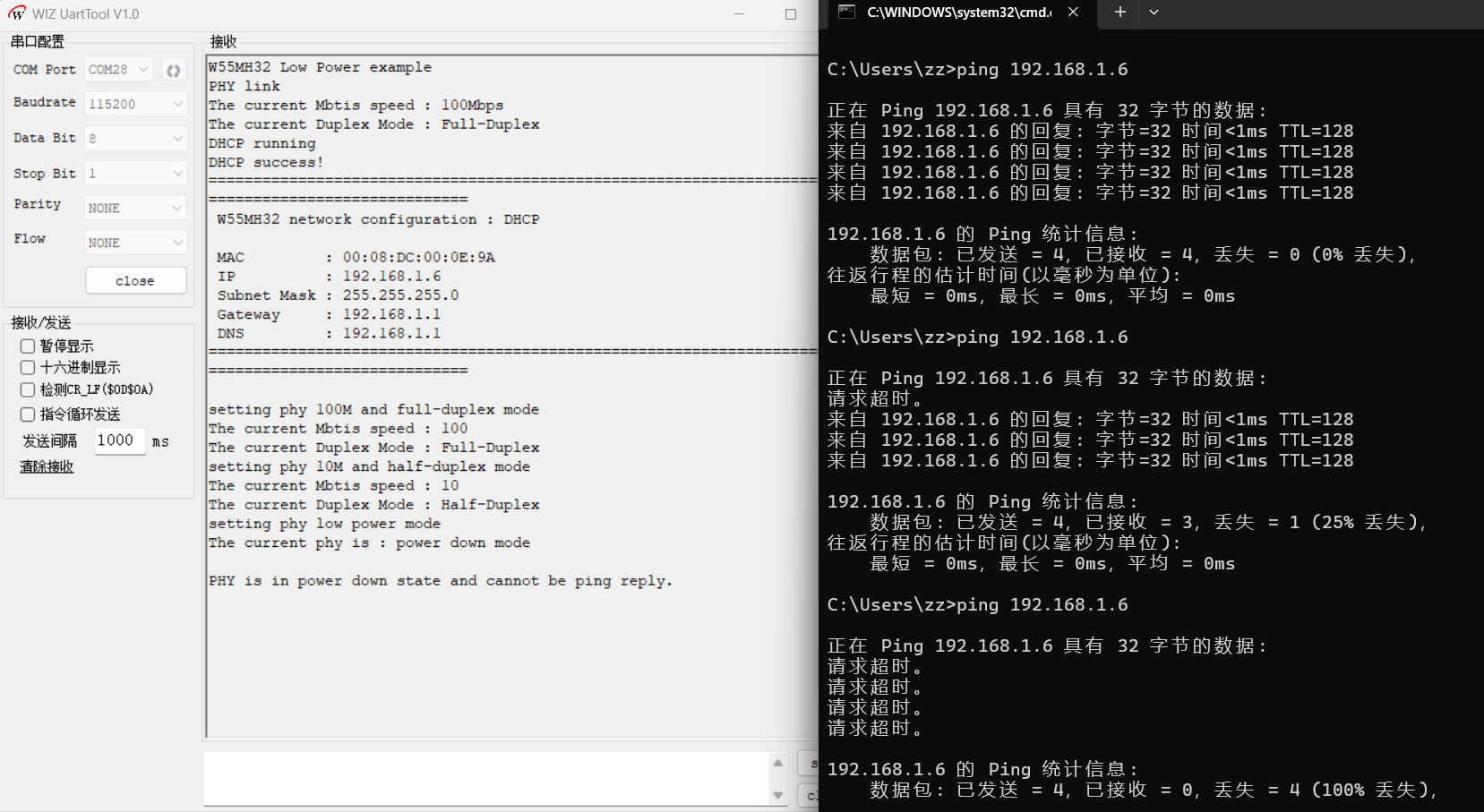
烧录例程运行后,首先进行 PHY 链路检测和网络地址信息打印,然后依次设置 PHY 为 100Mbps 全双工、10Mbps 半双工、掉电模式。打开 WIZ UartTool V1.0,连接 DEBUG USB 对应 COM 口(115200 / 8N1),预期串口输出如下:
W55MH32 Low Power example
PHY link
The current Mbtis speed : 100Mbps
The current Duplex Mode : Full-Duplex
DHCP running
DHCP success!
====================================================================================================
 W55MH32 network configuration : DHCP

 MAC         : 00:08:DC:00:0E:9A
 IP          : 192.168.1.6
 Subnet Mask : 255.255.255.0
 Gateway     : 192.168.1.1
 DNS         : 192.168.1.1
====================================================================================================

setting phy 100M and full-duplex mode
The current Mbtis speed : 100
The current Duplex Mode : Full-Duplex
setting phy 10M and half-duplex mode
The current Mbtis speed : 10
The current Duplex Mode : Half-Duplex
setting phy low power mode
The current phy is : power down mode
PHY is in power down state and cannot be ping reply.