SDIO - SD卡读写测试
更新于 2026年8月13日
本篇总结
使用 SDIO + FATFS,实现 MicroSD 卡的文件读写与目录管理。
本示例演示 W55MH32L 的 SDIO 主机外设驱动板载 MicroSD 卡槽,配合 FATFS 文件系统库实现 SD 卡的文件读写、目录创建/删除、根目录浏览及大数据压力测试。程序通过串口菜单接收数字命令(1~5)执行对应测试。
前置工具准备
开始本例程前,请确认以下工具已安装:
- WIZ UartTool V1.0:串口命令交互与日志观察工具:点击下载
- MicroSD 卡:容量 ≤ 32GB(SDHC),首次使用建议先在 PC 上格式化为 FAT32
硬件连接
W55MH32L 的 SDIO 主机通过 6 根信号线连接板载 MicroSD 卡槽:1 根时钟 + 1 根命令 + 4 根数据线。仅需一根 Micro USB 线连接开发板 DEBUG USB 口到 PC 用于串口交互,SD 卡插入开发板 MicroSD 卡槽即可。
| 引脚 | 功能 | 方向 | 模式 |
|---|---|---|---|
| PC12 | SDIO_CK | MCU → SD | 复用推挽 (AF_PP) |
| PD2 | SDIO_CMD | 双向 | 复用推挽 (AF_PP) |
| PC8 | SDIO_D0 | 双向 | 复用推挽 (AF_PP) |
| PC9 | SDIO_D1 | 双向 | 复用推挽 (AF_PP) |
| PC10 | SDIO_D2 | 双向 | 复用推挽 (AF_PP) |
| PC11 | SDIO_D3 | 双向 | 复用推挽 (AF_PP) |
SDIO 时钟说明:
- 识别阶段 FOD:≤ 400kHz,用于卡识别和初始化
- 数据传输 FPP:默认 25MHz,高速模式 50MHz(W55MH32 SDIOCLK = HCLK = 72MHz,分频得到 SDIO_CK = SDIOCLK / (CLKDIV + 2))
工程结构
工程位于 SDK 内 1.SDK\ModuleDemo\SDIO\,核心文件如下:
SDIO/
├── USER/
│   ├── main.c            ← 串口菜单 + FATFS 测试逻辑
│   ├── w55mh32_conf.h    ← 外设头文件集中包含
│   ├── w55mh32_it.c/h    ← 中断服务函数
│   ├── system_w55mh32.c/h← 系统初始化(时钟配置)
│   └── startup_w55mh32.s ← 启动文件
├── SYSTEM/
│   └── delay/
│       └── delay.c/h      ← SysTick 延时函数
├── BSP/
│   └── sdio_sdcard/
│       ├── bsp_sdio_sdcard.c/h ← SDIO 驱动(初始化/读写块)
│       └── sdio_test.c/h       ← SD 卡信息结构体定义
└── FATFS/
    ├── ff.c/h            ← FATFS 核心文件系统
    ├── diskio.c/h        ← FATFS 与 SDIO 驱动对接
    └── ffconf.h          ← FATFS 配置
步骤1:串口初始化
文件:USER/main.c | 函数:UART_Configuration() — 用于串口菜单交互和日志输出。
void UART_Configuration(uint32_t bound)
{
    GPIO_InitTypeDef  GPIO_InitStructure;
    USART_InitTypeDef USART_InitStructure;

    RCC_APB2PeriphClockCmd(RCC_APB2Periph_USART1, ENABLE);
    RCC_APB2PeriphClockCmd(RCC_APB2Periph_GPIOA, ENABLE);

    /* PA9: USART1_TX → 复用推挽输出 */
    GPIO_InitStructure.GPIO_Pin   = GPIO_Pin_9;
    GPIO_InitStructure.GPIO_Speed = GPIO_Speed_50MHz;
    GPIO_InitStructure.GPIO_Mode  = GPIO_Mode_AF_PP;
    GPIO_Init(GPIOA, &GPIO_InitStructure);

    /* PA10: USART1_RX → 浮空输入 */
    GPIO_InitStructure.GPIO_Pin  = GPIO_Pin_10;
    GPIO_InitStructure.GPIO_Mode = GPIO_Mode_IN_FLOATING;
    GPIO_Init(GPIOA, &GPIO_InitStructure);

    /* USART 参数:115200 / 8N1 / 全双工 */
    USART_InitStructure.USART_BaudRate            = bound;
    USART_InitStructure.USART_WordLength          = USART_WordLength_8b;
    USART_InitStructure.USART_StopBits            = USART_StopBits_1;
    USART_InitStructure.USART_Parity              = USART_Parity_No;
    USART_InitStructure.USART_HardwareFlowControl = USART_HardwareFlowControl_None;
    USART_InitStructure.USART_Mode                = USART_Mode_Rx | USART_Mode_Tx;

    USART_Init(USART_TEST, &USART_InitStructure);
    USART_Cmd(USART_TEST, ENABLE);
}
四步完成:开时钟 → GPIO 引脚模式配置(TX 复用推挽,RX 浮空输入)→ USART 参数配置(115200 / 8N1)→ 使能外设。后续菜单命令通过 GetCmd() 读取串口输入字符。
步骤2:SD 卡信息显示
函数:SDInfoShow() — SDIO 驱动初始化时已填充 SDCardInfo 全局结构体(卡类型、容量、块大小),本函数将其打印出来便于核对。
void SDInfoShow(void)
{
    printf("/***************************SD Info Show*******************************/\n");
    printf("SDCardInfo.CardType : %d\n", SDCardInfo.CardType);
    printf("SDCardInfo.CardCapacity : %lld Byte\n", (SDCardInfo.CardCapacity));
    printf("SDCardInfo.CardBlockSize : %d Byte\n", SDCardInfo.CardBlockSize);
}
CardType 取值:0=SDSC V1.0、1=SDSC V2.0、2=SDHC V2.0;CardCapacity 单位为字节,SDHC 卡块大小固定 512 字节。这些信息在 SDIO 初始化阶段通过 CMD0/CMD8/ACMD41/CMD2/CMD3/CMD9 等命令序列获取。
步骤3:文件系统挂载与格式化
函数:FatfsTest() 前半段 — 调用 f_mount() 挂载 FATFS,若返回 FR_NO_FILESYSTEM 表示卡未格式化,调用 f_mkfs() 创建文件系统后重新挂载。
void FatfsTest(void)
{
    res_sd = f_mount(&fs, "0:", 1);   /* 挂载逻辑盘 0: */

    printf("\n format test\n");
    if (res_sd == FR_NO_FILESYSTEM)
    {
        printf("The SD card has no file system and is about to be formatted\r\n");
        res_sd = f_mkfs("0:", 0, 0);  /* 格式化 */
        if (res_sd == FR_OK)
        {
            printf("The SD card successfully mounted the file system\r\n");
            res_sd = f_mount(NULL, "0:", 1);   /* 先卸载 */
            res_sd = f_mount(&fs, "0:", 1);    /* 再重新挂载 */
        }
        else
        {
            printf("SD card formatting failed\r\n");
            while (1);
        }
    }
    else if (res_sd != FR_OK)
    {
        printf("SD card mount failed (%d), maybe SD card initialization failed\r\n", res_sd);
        while (1);
    }
    else
    {
        printf("The file system is mounted and can be read and written for testing\r\n");
    }

    SDInfoShow();
f_mkfs 参数说明
第二个参数 0 表示使用 FATFS 默认格式(自动选择 FAT12/16/32);第三个参数 0 表示使用默认簇大小。格式化会擦除卡上所有数据,操作前请确认。
步骤4:文件读写测试
函数:FatfsTest() 后半段 — 打开(不存在则创建)文件 FatFs read and write test files.txt,写入一段字符串后关闭再重新打开读回验证。
    /* ---- 写测试 ---- */
    printf("\n file system test --->>> Write test\n");
    res_sd = f_open(&fnew, "0:FatFs read and write test files.txt",
                    FA_OPEN_ALWAYS | FA_WRITE | FA_READ);
    if (res_sd == FR_OK)
    {
        printf("Open/create FatFs to read and write the test file.txt successfully, and write data to the file\r\n");
        res_sd = f_write(&fnew, WriteBuffer, sizeof(WriteBuffer), &fnum);
        if (res_sd == FR_OK)
        {
            printf("The file was written successfully, the number of bytes written:% d The data written is: \n%s\r\n", fnum, WriteBuffer);
        }
        else
        {
            printf("File write failed (%d)\n", res_sd);
        }
        f_close(&fnew);
    }
    else
    {
        printf("Failed to open/create, file\r\n");
    }

    /* ---- 读测试 ---- */
    printf("\n file system test --->>> read test\n");
    res_sd = f_open(&fnew, "0:FatFs read and write test files.txt",
                    FA_OPEN_ALWAYS | FA_READ);
    if (res_sd == FR_OK)
    {
        printf("File successfully opened\r\n");
        res_sd = f_read(&fnew, ReadBuffer, sizeof(ReadBuffer), &fnum);
        if (res_sd == FR_OK)
        {
            printf("File read successful. Bytes read:% d The data read was: \n%s\r\n", fnum, ReadBuffer);
        }
        else
        {
            printf("File read failed (%d)\n", res_sd);
        }
    }
    else
    {
        printf("File opening failed\n");
    }

    f_close(&fnew);
    f_mount(NULL, "0:", 1);   /* 卸载文件系统 */
}
关键点:每次操作结束必须 f_close() 释放文件句柄,整个测试结束 f_mount(NULL, ...) 卸载卷。FA_OPEN_ALWAYS 表示文件不存在则创建。
如果你想自定义
- 改写入内容 → 修改
WriteBuffer[]字符串常量 - 追加模式写入 → 打开标志改为
FA_OPEN_ALWAYS | FA_WRITE | FA_OPEN_APPEND
步骤5:大数据压力测试
函数:FatfsBigDataTest() — 循环写入 0xFFFFF(约 104 万)次 WriteBuffer,约 2MB 数据量,每 0x8FFF 次输出一次进度点,用于压力测试 SDIO 4 线带宽和 FATFS 长时间写入稳定性。
void FatfsBigDataTest(void)
{
    uint32_t i;

    res_sd = f_mount(&fs, "0:", 1);

    printf("\nFile system test --->>> write test\n");
    res_sd = f_open(&fnew, "0:FatFs read and write test files.txt",
                    FA_OPEN_ALWAYS | FA_WRITE | FA_READ);
    if (res_sd == FR_OK)
    {
        printf("Open/create FatFs to read and write the test file.txt successfully, and write data to the file\r\n");

        for (i = 0; i < 0xFFFFF; i++)
        {
            res_sd = f_write(&fnew, WriteBuffer, sizeof(WriteBuffer), &fnum);
            if ((i % 0x8FFF) == 0)
            {
                printf("......\n");   /* 进度提示 */
            }
        }
        if (res_sd == FR_OK)
        {
            printf("File written successfully\n");
        }
        else
        {
            printf("File write failed (%d)\n", res_sd);
        }
        f_close(&fnew);
    }
    else
    {
        printf("Failed to open/create, file\r\n");
    }
}
2MB 数据写入完成后,SDHC 卡在 SDIO 4 线 25MHz 模式下典型耗时约 10~20 秒。若写入失败常见原因:卡未格式化、卡容量不足、SDIO 时钟过高导致 CRC 错误。
步骤6:目录管理与查看
函数:CreateDir() / DeleteDirFile() / ViewRootDir() — 演示 FATFS 目录创建、删除(含嵌套子目录)和根目录遍历查看。
/* 创建 /Dir1、/Dir2、/Dir1/Dir1_1 三级目录 */
void CreateDir(void)
{
    res_sd = f_mount(&fs, "0:", 1);
    if (res_sd != FR_OK)
    {
        printf("Failed to mount file system (%d)\r\n", res_sd);
    }

    res_sd = f_mkdir("/Dir1");
    if (res_sd == FR_OK)            printf("f_mkdir Dir1 OK\r\n");
    else if (res_sd == FR_EXIST)    printf("Dir1 Target already exists(%d)\r\n", res_sd);
    else { printf("f_mkdir Dir1 fail(%d)\r\n", res_sd); return; }

    res_sd = f_mkdir("/Dir2");
    if (res_sd == FR_OK)            printf("f_mkdir Dir2 OK\r\n");
    else if (res_sd == FR_EXIST)    printf("Dir2 Target already exists(%d)\r\n", res_sd);
    else { printf("f_mkdir Dir2 fail (%d)\r\n", res_sd); return; }

    res_sd = f_mkdir("/Dir1/Dir1_1");
    if (res_sd == FR_OK)            printf("f_mkdir Dir1_1 OK\r\n");
    else if (res_sd == FR_EXIST)    printf("Dir1_1 Target already exists(%d)\r\n", res_sd);
    else { printf("f_mkdir Dir1_1 fail (%d)\r\n", res_sd); return; }

    f_mount(NULL, "0:", 1);
}

/* 删除目录与文件:目录必须为空才能删除 */
void DeleteDirFile(void)
{
    res_sd = f_mount(&fs, "0:", 1);
    if (res_sd != FR_OK)
    {
        printf("Failed to mount file system (%d)\r\n", res_sd);
    }

    /* 必须先删子目录 /Dir1/Dir1_1,再删 /Dir1,否则 FR_NO_EMPTY_DIR */
    res_sd = f_unlink("/Dir1/Dir1_1");
    /* ... 省略错误处理,详见完整工程 ... */

    res_sd = f_unlink("/Dir1");
    /* ... */

    res_sd = f_unlink("/Dir2");
    /* ... */

    res_sd = f_unlink("FatFs read and write test files.txt");
    /* ... */

    f_mount(NULL, "0:", 1);
}

/* 遍历根目录,打印每个条目的属性/大小/短名/长名 */
void ViewRootDir(void)
{
    DIR      dirinf;
    FILINFO  fileinf;
    uint32_t cnt = 0;
    char     name[256];

    res_sd = f_mount(&fs, "0:", 1);
    if (res_sd != FR_OK)
    {
        printf("Failed to mount file system (%d)\r\n", res_sd);
    }

    res_sd = f_opendir(&dirinf, "/");
    if (res_sd != FR_OK)
    {
        printf("Failed to open root directory (%d)\r\n", res_sd);
        return;
    }

    fileinf.lfname = name;
    fileinf.lfsize = 256;

    printf("attribute		|	file size	|	short filename	|	long file name\r\n");
    for (cnt = 0;; cnt++)
    {
        res_sd = f_readdir(&dirinf, &fileinf);
        if (res_sd != FR_OK || fileinf.fname[0] == 0)  break;   /* 读完毕 */
        if (fileinf.fname[0] == '.')                    continue; /* 跳过 . 与 .. */

        if (fileinf.fattrib & AM_DIR)
            printf("(0x%02d)directory", fileinf.fattrib);
        else
            printf("(0x%02d)attribute", fileinf.fattrib);

        printf("%10d	", fileinf.fsize);
        printf("	%s |", fileinf.fname);
        printf("	%s\r\n", (char *)fileinf.lfname);
    }

    f_mount(NULL, "0:", 1);
}
目录删除顺序
FATFS 的 f_unlink 只能删除空目录。删除嵌套目录必须自底向上:先删 /Dir1/Dir1_1,再删 /Dir1,否则报错。只读属性文件需先 f_chmod 清除 AM_RDO 才能删除。
步骤7:主函数逻辑
函数:main() — 初始化 CRC/延时/串口 → 打印时钟与菜单 → 循环读取串口数字命令分发到对应测试函数。
int main(void)
{
    uint8_t           cmd = 0;
    RCC_ClocksTypeDef clocks;

    RCC_AHBPeriphClockCmd(RCC_AHBPeriph_CRC, ENABLE);  /* FATFS 部分校验用到 CRC 硬件 */
    delay_init();
    UART_Configuration(115200);
    RCC_GetClocksFreq(&clocks);

    printf("\n");
    printf("SYSCLK: %3.1fMhz, HCLK: %3.1fMhz, PCLK1: %3.1fMhz, PCLK2: %3.1fMhz, ADCCLK: %3.1fMhz\n",
           (float)clocks.SYSCLK_Frequency / 1000000, (float)clocks.HCLK_Frequency / 1000000,
           (float)clocks.PCLK1_Frequency / 1000000, (float)clocks.PCLK2_Frequency / 1000000,
           (float)clocks.ADCCLK_Frequency / 1000000);

    printf("SDIO SD Card Fatfs Test.\n");
    TestList();

    while (1)
    {
        cmd = GetCmd();
        switch (cmd)
        {
        case '1':
            printf("1.--->>>FatfsTest\r\n");
            FatfsTest();
            TestList();
            break;
        case '2':
            printf("1.--->>>FatfsBigDataTest\r\n");
            FatfsBigDataTest();
            TestList();
            break;
        case '3':
            printf("2.--->>>ViewRootDir\r\n");
            ViewRootDir();
            TestList();
            break;
        case '4':
            printf("3.--->>>CreateDir\r\n");
            CreateDir();
            TestList();
            break;
        case '5':
            printf("4.--->>>DeleteDirFile\r\n");
            DeleteDirFile();
            TestList();
            break;
        default:
            break;
        }
    }
}
TestList() 打印 5 个测试菜单项;GetCmd() 非阻塞读取串口接收到的数字字符。每个测试执行完后重新打印菜单。
如果你想自定义
- 添加新测试项 → 在
switch(cmd)中增加 case 分支,同步在TestList()增加菜单打印 - 开机自动跑一次基础测试 → 在
while(1)之前直接调用FatfsTest()
步骤8:printf 重定向
重写 fputc() 将 printf 输出重定向到 USART1,并自动在 \n 前补 \r 确保串口工具正确换行。
int SER_PutChar(int ch)
{
    while (!USART_GetFlagStatus(USART_TEST, USART_FLAG_TC));
    USART_SendData(USART_TEST, (uint8_t)ch);
    return ch;
}

int fputc(int c, FILE *f)
{
    if (c == '\n')
    {
        SER_PutChar('\r');         // 补回车,确保串口工具正确换行
    }
    return (SER_PutChar(c));
}
编译与下载
Keil MDK 中打开 SDIO.uvprojx,F7 编译,确认 0 Error(s)。连接 DEBUG USB 口到 PC,F8 下载。下载成功后按 RESET 键启动新固件。运行前请确保 MicroSD 卡已插入卡槽。
运行验证
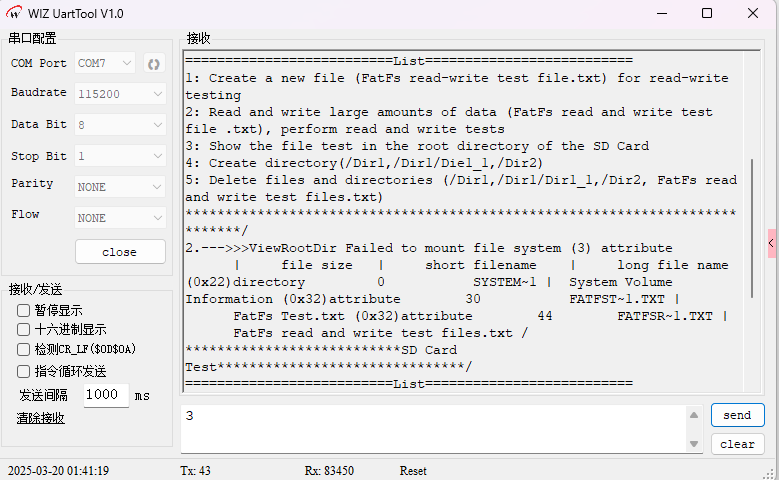
打开 WIZ UartTool V1.0 ,选择开发板对应 COM 口,波特率 115200 / 8N1,打开串口。按 RESET 启动后,预期串口输出菜单:
SYSCLK: 72.0Mhz, HCLK: 72.0Mhz, PCLK1: 36.0Mhz, PCLK2: 72.0Mhz, ADCCLK: 36.0Mhz
SDIO SD Card Fatfs Test.
/***************************SD Card Test*******************************/
==========================List==========================
1: Create a new file (FatFs read-write test file.txt) for read-write testing
2:
Read and write large amounts of data (FatFs read and write test file .txt), perform read and write tests
3: Show the file test in the root directory of the SD Card
4: Create directory(/Dir1,/Dir1/Die1_1,/Dir2)
5: Delete files and directories (/Dir1,/Dir1/Dir1_1,/Dir2, FatFs read and write test files.txt)
****************************************************************************/
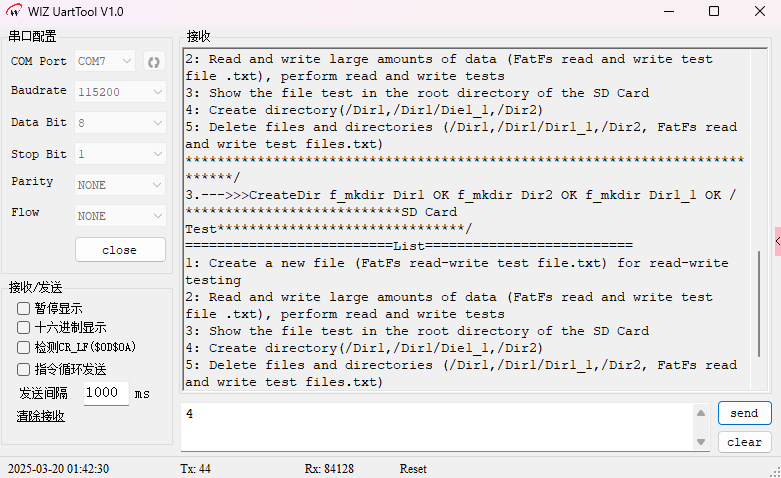
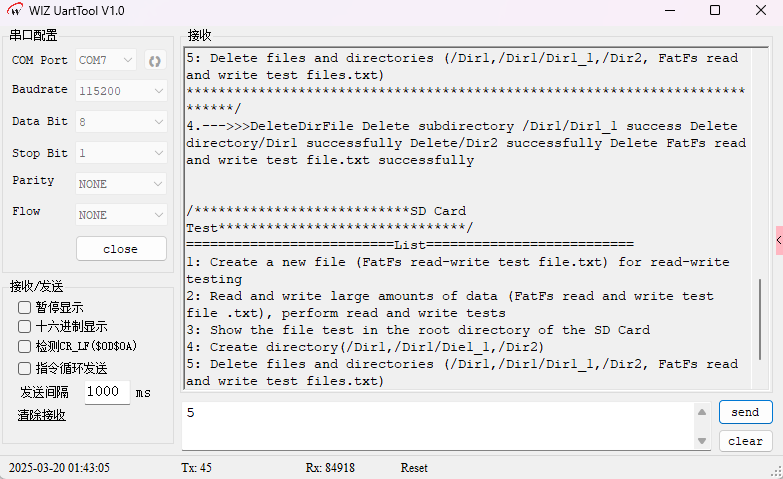
在发送区输入数字 1~5 触发对应测试:
- 1 - 基础文件读写:首次运行会因无文件系统触发格式化,随后创建文件并写入/回读一段文本
- 2 - 大数据压力测试:写入约 2MB 数据,期间周期打印 "......" 进度点
- 3 - 查看根目录:列出根目录所有条目的属性/大小/短名/长名
- 4 - 创建目录:在根目录创建 /Dir1、/Dir2、/Dir1/Dir1_1
- 5 - 删除目录与文件:按"子目录→父目录→文件"顺序删除
常见问题
Q: f_mount 返回 FR_NOT_READY 或 SD 卡初始化失败
检查 SD 卡是否插到位、卡容量是否 ≤ 32GB(SDHC)。W55MH32 SDIO 不支持 SDXC 卡。若卡是 SDXC(>32GB),需在 PC 上先用工具重新格式化为 FAT32。
Q: f_mount 返回 FR_NO_FILESYSTEM
卡上无 FAT 文件系统。运行测试 1 会自动触发 f_mkfs 格式化;或先在 PC 上右键格式化为 FAT32(默认簇大小)后再插入开发板。
Q: 大数据写入过程中途失败(FR_DISK_ERR / FR_RW_ERROR)
多为 SDIO 时钟过高导致 CRC 校验错误。降低 SDIO_ClockDiv(增大分频系数)让 SDIO_CK ≤ 25MHz;劣质 SD 卡也可能写块失败,建议换品牌卡测试。
Q: f_unlink 删除目录失败
FATFS 只能删除空目录。嵌套目录必须自底向上删除:先删 /Dir1/Dir1_1,再删 /Dir1。若目录下有文件,需先删全部文件再删目录。
Q: ViewRootDir 显示中文长文件名乱码
检查 ffconf.h 中 _LFN_UNICODE 与 _CODE_PAGE 配置。中文需 _CODE_PAGE = 936(GBK),并确保 fileinf.lfname 缓冲区指针已正确赋值。
总结
本文基于 W55MH32L 的 SDIO 主机外设驱动 MicroSD 卡并挂接 FATFS 文件系统:
- SDIO 4 线模式:PC8~PC11(D0~D3) + PC12(CK) + PD2(CMD),识别阶段 400kHz,数据传输 25MHz
- FATFS 集成:通过
f_mount/f_open/f_read/f_write/f_close/f_mkdir/f_unlink/f_opendir/f_readdir完整覆盖文件系统操作 - 典型流程:挂载 → 必要时格式化 → 打开文件 → 读写 → 关闭 → 卸载;目录操作需自底向上删除
- 关键细节:FATFS 部分校验用到 CRC 硬件,
main()中需使能RCC_AHBPeriph_CRC;SDXC 卡需先格式化为 FAT32 才能使用